Building Modern Tools for Computational Science in Flutter to Track the American Chestnut
By Dr. Jay Jay Billings
I recently had the opportunity and privilege to present my talk “Building Modern Tools for Computational Science in Flutter to Track the American Chestnut” at the US RSE 2026 Conference in San Jose, CA. As I was uploading my slides to Zenodo, I realized I could also upload a video, which made me realize that I could also write a companion blog article, which… well, I think you get the point. I hope you find the video and blog interesting or entertaining. You can email me at [email protected] if you have questions. – Jay Jay
Introduction
One of the great things about working at a public benefit company is that we get to work on projects that only make sense when you’re trying to do the right thing and are passionate about it. Right after we opened, I spent some time with colleagues at the American Chestnut Foundation and learned how challenging it can be to work with big data in big orchards and state forests. I wanted to develop a small app to help track trees in those settings as well as the deep woods where I occasionally go timber cruising.
You can learn more about that product at its page. This article will tell you why and how we built it, and why we leaned heavily into automation and code generation.
The American Chestnut
My family used to sit around the wood stove at Christmas trading old stories and legends of Appalachia. My grandfather would, after a time, start cracking chestnuts, which he always ate raw. One Christmas, while I was examining one of those curious brown nuts, he told me the story of the American Chestnut tree and asserted I would be lucky if I ever saw one, especially a wild one.
The American chestnut is a functionally extinct keystone hardwood species in the eastern US. The former range of this tree was from Nova Scotia to southern Georgia, and in some places it accounted for nearly 1 in 4 trees. It produced a light, strong wood that was rich in tannins and highly water resistant. Chestnut barns built over a century ago still stand all throughout the Appalachian Highlands, sometimes being recovered for furniture or paneling. (We had wormy chestnut paneling in one of our houses when I was little.)
It also reliably produces chestnuts every year and became a dietary staple of explorers and settlers as soon as they encountered it. By the early 20th century, it was such an important crop that it was accepted in lieu of cash and the annual nut harvest even dictated train schedules.
Two invasive pathogens, C. Parasitica and P. Cinnamomi, along with a million happy axes, devastated the chestnut population in the 20th century. This caused immeasurable damage to forest species over several decades as that reliable annual crop of chestnuts slowly vanished, and quite a few Appalachian towns disappeared as they lost the nutritional and economic benefits of the nuts and lumber.
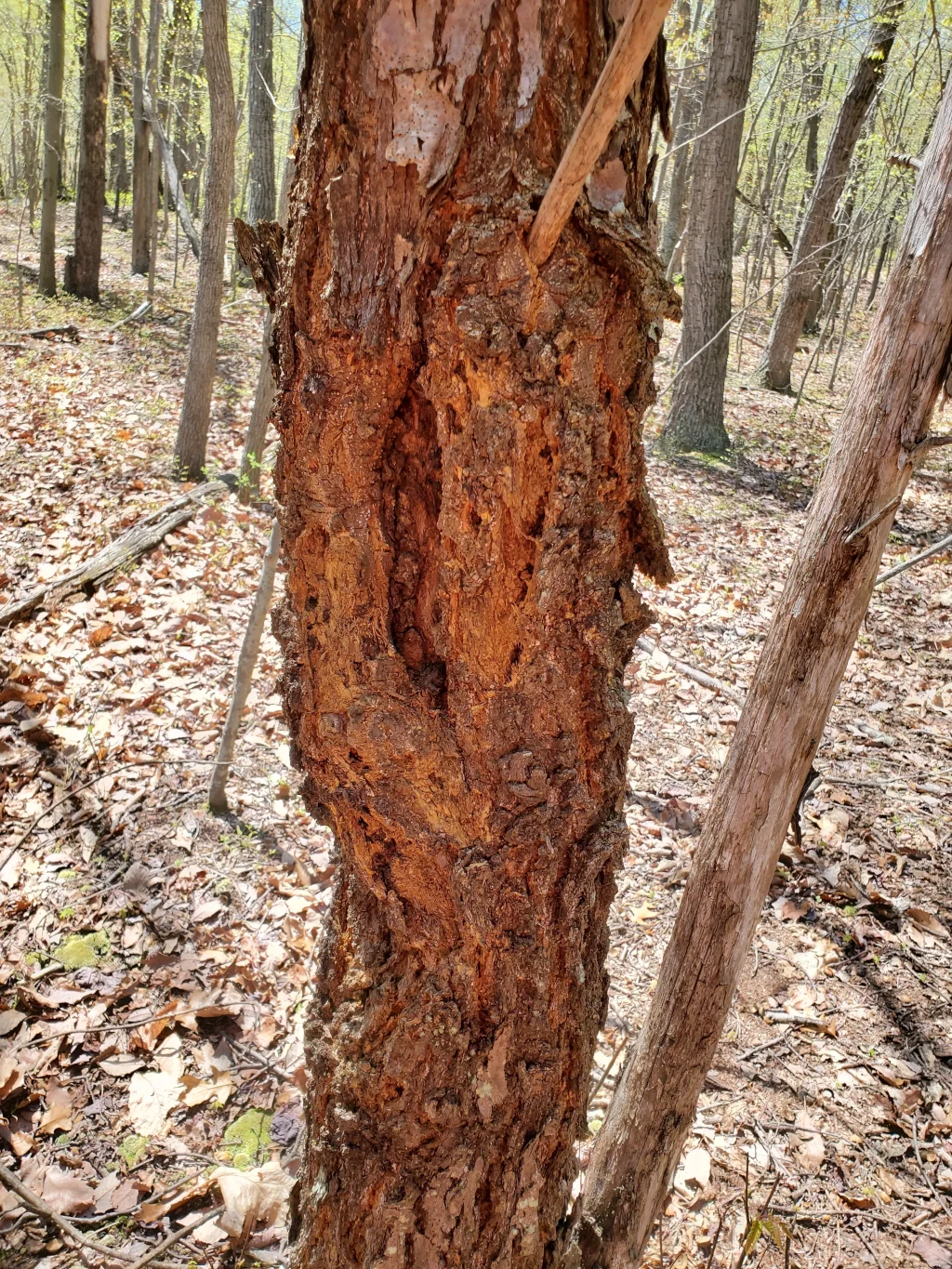
The American Chestnut Foundation (TACF) is leading the fight to restore this species. You can learn everything there is to know about identifying wild chestnut trees, growing trees from nuts, their hybridization and recurrent genomic selection (RGS) programs to develop blight- and root rot-resistant varieties, and how to volunteer or donate on their website. Their programs require large amounts of space and volunteers to plant, inoculate, monitor, and harvest the trees (which is how I got involved). Much of their work has focused on producing, via backcrossing, a hybrid chestnut tree with 15/16th (93.75%) American Chestnut DNA and significant blight resistance from the Chinese Chestnut. The RGS process will speed up the breeding cycle and select desirable traits by using genetic sampling and hand-pollination to identify the best trees for the next generation. More information on that process is available on the TACF’s YouTube channel.
Tracee
We originally built our tree tracking app, Tracee, based on input from collaborators at TACF, my own experience volunteering, and my experience wandering off in the woods on my own to hunt chestnut trees. (I’ve been escaping to the woods for decades, but hunting chestnuts is new.) The idea of “tree tracking” may seem obtuse since trees are enormous, stationary, and breathtaking, but the nuance comes from the surrounding environment. Is it a wild tree on a mountainside that maybe only a few people have seen? Was it a seedling the last time you saw it, and you don’t know where someone transplanted it? Is it in a dense orchard where there are so many trees that they can be hard to count? Or maybe it is in an old orchard where father time, natural death, culling, and roguing have caused rows and landmarks to vanish? If we expand the environment to urban and park settings, then we get into a whole other set of questions and the commercial realm of “tree assessments,” where tree health is often translated into property, timber, or conservation value.
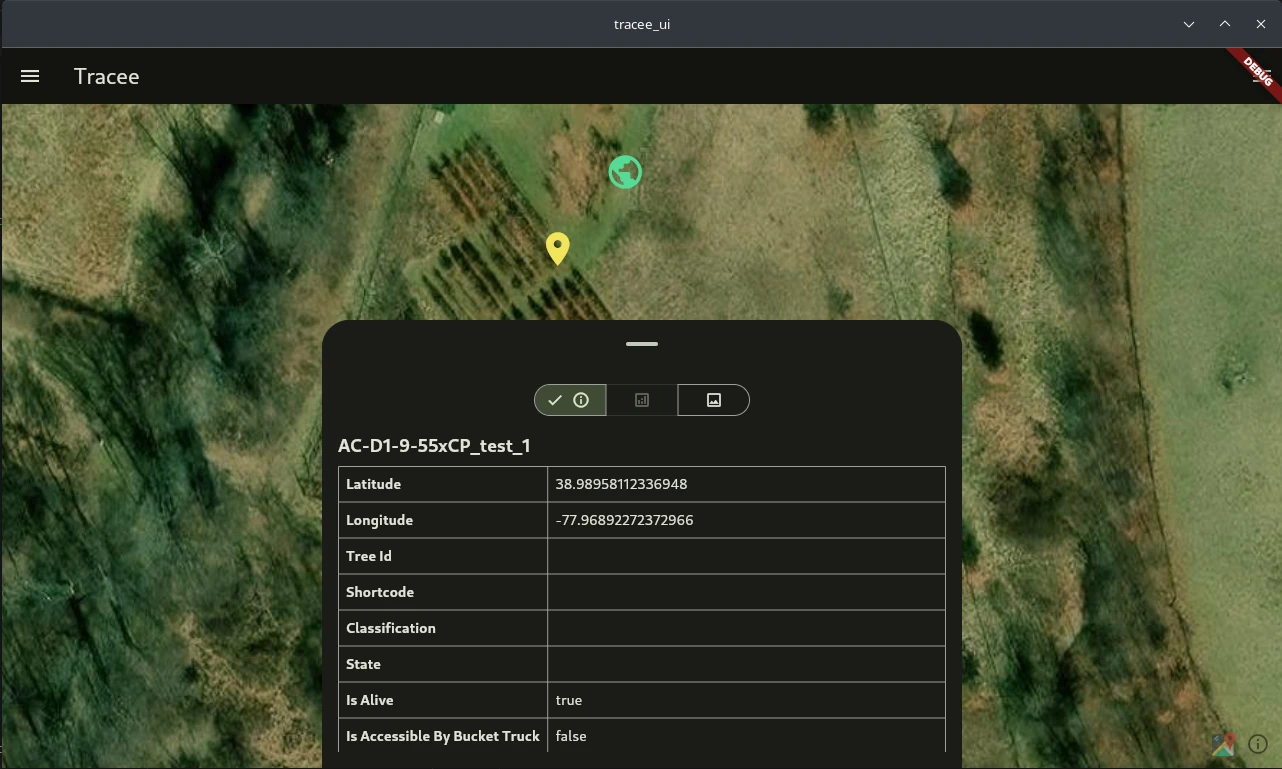
Tracee is primarily GIS-driven, meaning that it uses maps, imagery, and geolocation in the workflow to help users track trees. It works on six operating systems and is available in community, cloud, and enterprise editions. Users can identify objects, log the position, and add metadata with the phone in their hand or from the comfort of their workstation. They can also capture notes through dictation and use manual (community edition) or cloud-based syncing to share their data. Tracee dynamically switches its UI to accommodate the user’s work mode so folks in the field looking up at a 100-foot tree aren’t also trying to type.
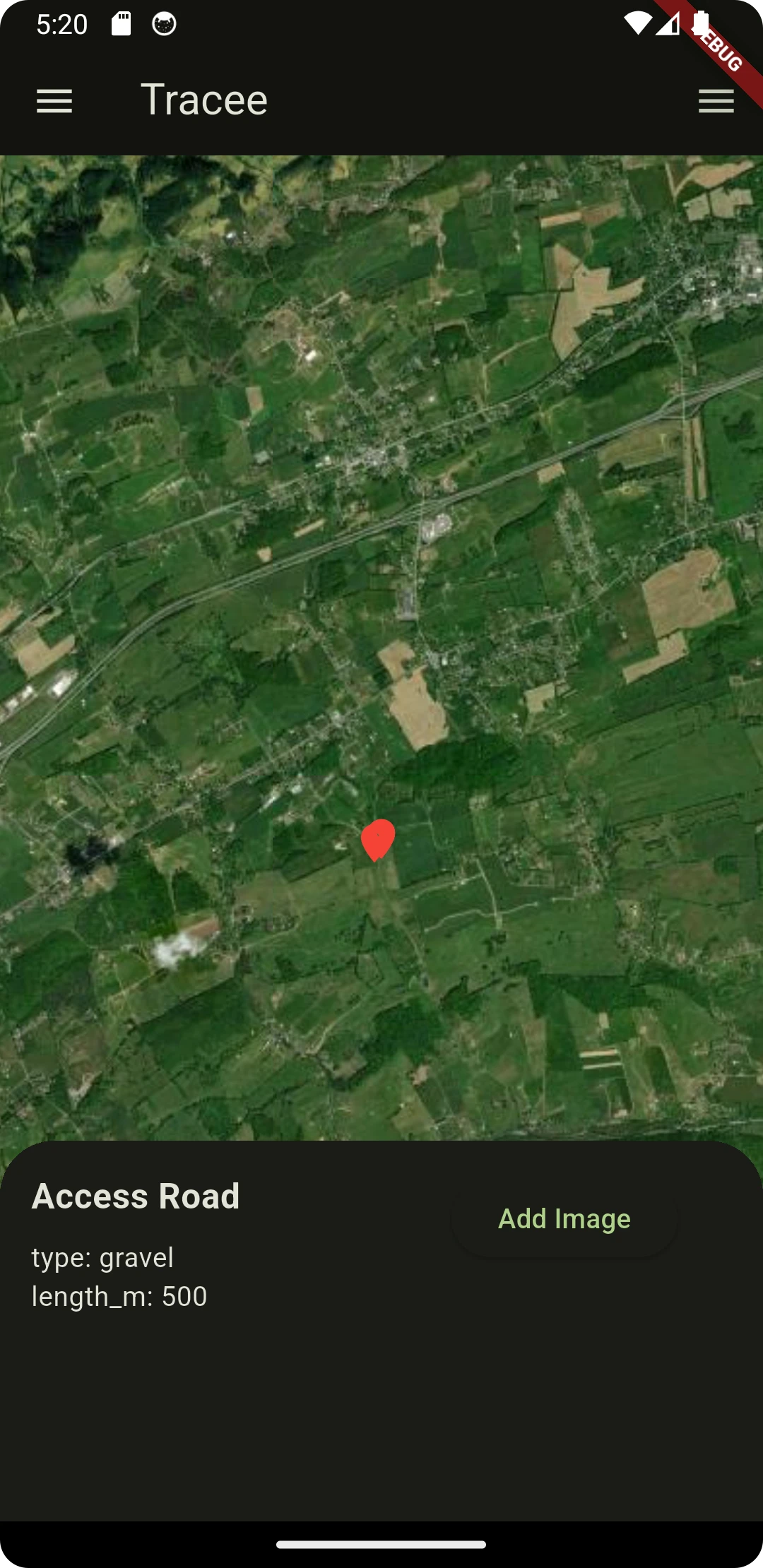
I say “objects” because we quickly learned that Tracee can be used for tracking more than chestnut trees. For example (and being completely honest), I actually track more maple trees with Tracee than chestnuts because I’m a maple sugarer. I spend a few months a year gathering sap, and I want to track the health of my trees each season. We’ve also experimented with using Tracee to track “geographic features of interest” for some sponsors, food crops, and urban points of interest.
We built Tracee with Flutter. Flutter is a cross-platform app development framework that is the workhorse of our cross-platform support. Behind the scenes, Flutter builds with CMake on laptops and workstations and uses native build systems on iOS and Android. It is the best “write once, run anywhere” framework I’ve used. It is written in Dart, which is an enjoyable, albeit sometimes curious, language.
I mentioned that our initial prototype of Tracee was vibe-coded. We did this knowing full well that we would have to rewrite the app, but we wanted to understand how far we could go before it broke. It was a surprisingly disappointing experiment. We paid for it over the next few months as we refactored the code, but it also produced downstream results for us that were ultimately good.
Tracee wasn’t the first or only product we’ve built at the Band Gap. However, it has been the most impactful in crafting our internal development process and giving us a framework, Stager, on which we build other applications. Stager has two primary components: its cross-platform parts and its native plugins, which specialize in system-level behavior on specific operating systems. For example, we use different audio capture libraries on Linux and Windows. Tracee now only contains the “app” features, which exist at a higher level than the feature in Stager. These app features include things like component configurations, branding, and data, as opposed to Stager’s selection framework, dictation tooling, map connectors, tree editors, reusable widgets, and other lower-level components.
Stager emerged, in part, as payment for our sins of vibe coding the prototype, and, in another part, because we realized that tree tracking is a variant on a particular type of application that we could standardize somewhat generically (in the templating sense) and reuse if we thought ahead. How we built Stager, therein rebuilding Tracee, has become our standard development process.
How we built it
I won’t claim that Band Gap is an “AI-first” company, because that’s a lie. Obviously, as a benefit corporation, people come first for us. We like to say that we’re an “AI-native” company that uses machine learning and artificial intelligence, including large language models, to make three people seem like thirty. We see code generation as a tool like any other; LLM-based code generation is simply a different flavor of a very old technology.
The real trick for us was learning how to integrate high degrees of automation into our workflows to create an AI-native software development process that accelerates us. We noticed very quickly that “massive” gains in one phase of development might be completely erased by mistakes or even normal delays in another phase, creating a false sense of productivity. Likewise, we also noticed that cognitive debt caused by high automation is problematic and expensive because it builds unreasonable confidence and assumptions. (I’m lucky to be a former middle-manager, so I had some tricks for handling that one.) Finally, we had a hunch that co-design, pair-programming, and creative use of agents and MCP servers are far more effective than tokenmaxxing. This hunch has, perhaps, turned out to be the most important, and now we always assume two actors working on any given task: a human and an agent. This is true across all tasks, even those that don’t involve code development.
I have always appreciated the hump chart from the Rational Unified Process framework (RUP). I worked with RUP twenty years ago and the image of the hump chart stuck with me. It is like the Hertzsprung-Russell diagram, but qualitative and for software products instead of quantitative and for stars. It describes the phases, iterations, and level of effort for different development activities over time and is a generally good way to simplify the software development lifecycle.
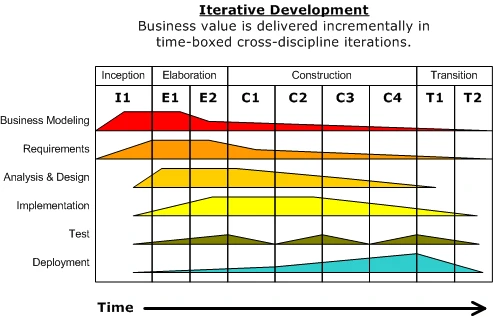
We used this notion to separate roles by phase such that human taskers engage in one set of activities and agents engage in another. The sections below describe how this breaks down by activity type (requirements gathering, implementation, etc.) with the implicit understanding that the activities in every phase and iteration happen with different intensity over time.
Business Modeling & Requirements
Business modeling and requirements gathering are probably the most hated software and product development activities, but everyone does them. Yes, even scientists engage in business modeling whether for software development, experiments, or building large user facilities. Most of the tasks that give these activities a bad rap are things large language models do very well. For example, generating a vision document (or “Amazon 6 pager/PR FAQ,” if you prefer) by hand is tedious and time-consuming. These documents are heavily templated with thorough instructions, and the majority of the time is spent synthesizing facts from other sources. In practice, at large companies, the most junior and inexperienced member of the product development team usually writes these documents, and they are later reviewed. At Band Gap, we let LLMs write the first draft of these documents based on data they gathered from recording us, interviewing us, and digging through our documents. Then, we can review and rewrite the artifact from a better starting point. The following table roughly captures how we divide these kinds of activities between humans and agents.
| Human Tasks | Agent Tasks |
|---|---|
Strategic planning and decision making | Generating initial vision documents, slides, etc. |
Interviewing other humans | Recording and auditing |
Field trips and site visits | Interviewing internal staff |
Reviewing all artifacts | Initializing market research |
Analysis & Design
We analyze requirements and generate designs as a team, but each human works cooperatively with an agent in a kind of… digital meat-grinding process… to co-design their portion of the work.
It would be superb if there were a better way to describe this, but “digital meat-grinder” is the best I’ve got for now.
Our primary goal with these activities is to generate an actionable high-level design document that can be used for implementation. We don’t have much use for low-level design documents because the company is very small and we don’t have to argue about how classes are designed or implemented or what libraries we “just absolutely totally must use.” To that end, we’ve created a design document template that we collaboratively develop with an agent. The human designer writes the initial document and uses the agent’s search and reasoning capabilities to research and propose additional refinements, which can happen right in the document. Our template includes the identifying information for the feature; the document revision history; the feature’s context, background, and goals; any exclusions from the work; the proposed design and alternatives; implementation details; the testing plan and a short example; open questions; the review and audit trail; and a full list of generated tasks and tickets.
Following this process usually takes 2-3 days to complete and produces an HLD that can be used to generate a working, tailored feature in an additional 2-3 days. Our internal measurements indicate that this is approximately twice as fast as doing it without agents because their context-specific search capabilities are so enabling.
The table below shows how we divide analysis and design activities between humans and agents.
| Human Tasks | Agent Tasks |
|---|---|
Strategic planning and decision making | Being a glorified search engine |
Defining key milestones and objectives | Auditing and compliance (complaining) |
Explaining and directing reasoning | Translating discussion points and decisions into design docs |
Suffering through broetry | Generating task lists |
Implementation
Implementation is one of those things that human engineers - properly trained ones, at least - perform significantly better than foundation models. The early marketing hype from large AI labs promised we would all be out of a job three years ago because “AI is a better coder,” but we’re not. It is one thing to regurgitate the solution to a LeetCode problem, vibe code some slop in a few minutes, or find bugs quickly, and it is an entirely different thing to be able to make sound engineering decisions.
As mentioned previously, we use agents simply as code generation tools during implementation, not as decision makers. We do this primarily in two ways. First, we use a whole suite of code generators, from project generators to language and source templates to transcoders, before we use agents and LLMs. These generators produce highly deterministic output in seconds and, for what they do, outperform LLMs with no hallucinations. Most of the tasks these generators perform complement what LLMs will generate. Project generators, like the Very Good CLI for Flutter and Dart, are particularly well-suited for what they do compared to LLMs.
Second, we have a templated agent scaffold that is consistent across all of our projects for working with LLMs. (It is open source, and you can download it from our GitLab group.) Our scaffold adds scoring, score checking, and persistent memory to our agents and exposes them to our design documents. There are many situations where LLMs will burn up all the tokens in the world to generate an incorrect implementation of very basic, if not fundamental, programming tasks. (My favorite is when they create maps with bound types like <bool, bool>.) Our scaffolding largely protects against these errors as well.
The table below shows how we separate tasks between humans and agents during implementation.
| Human Tasks | Agent Tasks |
|---|---|
Directing agents on how to fix starter code and boilerplate | Generating starting code and boilerplate |
Writing the “real” code | Auditing and compliance (more complaining) |
Making consequential engineering decisions | Generating initial tests |
Setting all standards, picking languages, etc. | Suggesting optimizations and improvements |
Looking Ahead & Thanks
I’ll save the details of how we use heavy automation in testing and deployment for a future post. It is more of the same that we saw in the previous section, and you can rest assured that “auditing” is still on the list. (And if you want to help us with testing, have a look at our call for testers.)
We’re pushing ahead on enterprise features for Tracee using the process and tools we’ve discussed here, with some fall deployments here before we know it. Stager has a set of enterprise features coming its way too, and we may propose it as an Eclipse project in the future.
One of the more exciting developments is that this article simply describes the beginning of our journey and where our internal development processes were about six months ago. Since then, we’ve developed a new “internal engineering system” or “meta-agent” that strongly mixes the features of workflow engines like Eclipse ICE with systems programming, fast distributed memory, and normal agents (if I can get away with calling agents “normal”). I’m not sure it is doing anything interesting yet, but it’s sure going to fun finding out!
I’m very grateful for the collaboration and discussion with my colleagues at TACF, including John Scrivani, Vasiliy Lakoba, and Lucinda Wigfield. I learned a lot about big data for forestry and tracking trees, and I look forward to seeing what Tracee and Stager can do next. I am also grateful to the US RSE community for accepting and attending my talk.
Did you know you can hire Band Gap if you need help with software engineering, AI & ML, or all sorts of other computing projects? Email [email protected] if you have questions or would like to receive our capabilities statement.